Put any car in a showroom, without touching the car
Cars are usually photographed where they are parked: on the street, in a yard, next to other cars. ReplaceMyBG lifts the car out and places it in a showroom, a studio or any scene you describe, while the car keeps its original pixels.
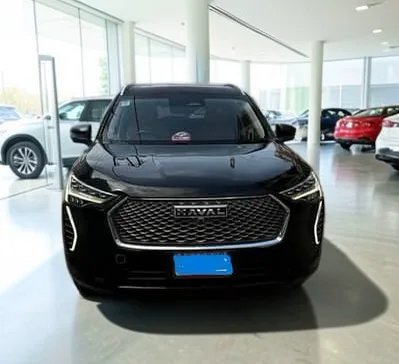
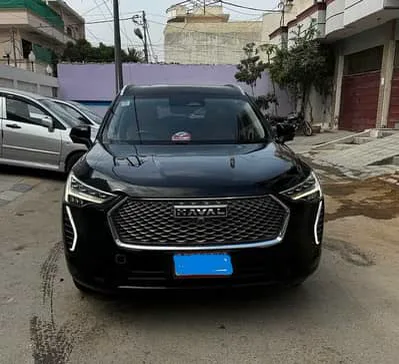
Honest listings
Buyers compare photos with the car they see in person. Because the AI never redraws the vehicle, the paint, badges, trim, wheels and damage are exactly as photographed. Only the surroundings change, which makes listings cleaner without misrepresenting the car.
Scenes that work well for cars
Describe the place in a few words, for example:
- a bright modern car showroom with a polished concrete floor
- a clean white studio with a soft shadow
- an empty coastal road at golden hour
- a dark studio with soft rim lighting
A whole stock list, and walk-around videos
On the Pro plan, batch processing gives a run of photos the same background in one go, and the video tool removes the background from walk-around clips up to 60 seconds long.
Questions
Will the car look different after the background is changed?
No. The car is cut out and its original pixels are placed on the new background. Paint, badges, wheels and number plates stay exactly as photographed.
Can the AI add a shadow under the car?
Yes. AI scenes include a natural shadow where the car meets the ground, and photo or colour backgrounds can use the floor or cast shadow options.
Does it work with phone photos?
Yes. It runs in the browser on a phone or a computer, and works with ordinary phone photos.
Change the background. Never the product.
Every approved account gets 5 cutouts and 1 AI scene free. It runs in the browser on your phone or computer.
Create a free accountMore ways to use it
- Product photosPut any product photo on a white studio, a colour or an AI-made scene. Your product keeps its original pixels: no redrawn logos, labels or colours.
- AI backgroundsDescribe a scene and AI paints it behind your subject. Unlike tools that redraw the whole image, your subject keeps its original pixels.
- Remove backgroundRemove the background from a photo and save a transparent PNG at full resolution. Clean edges down to single hairs, with a brush to touch up.
- HeadshotsTurn a photo taken anywhere into a clean headshot: plain colour, soft blur or a studio. Your face and clothes stay exactly as photographed.
- Video backgroundsRemove the background from a video up to 60 seconds: transparent, green screen, a colour, blur or a new backdrop. The subject is never redrawn.